
Continuous time logging for iPhone
Embrace what actually happened.
Keep a continuous time log. Name the activity; the next interval starts automatically.
Most time tools are just perfectionist wishful thinking. Finished something? Drop a line. It’s that simple.
Free to download · iPhone · iOS 26 or later
 Scan with your iPhone
Activities and thoughts, together in your timeline.
In this 30-second recording: log a movie, fill an earlier gap, add a thought, and review the day.
Open the demo videoView a real Timeline screenshot
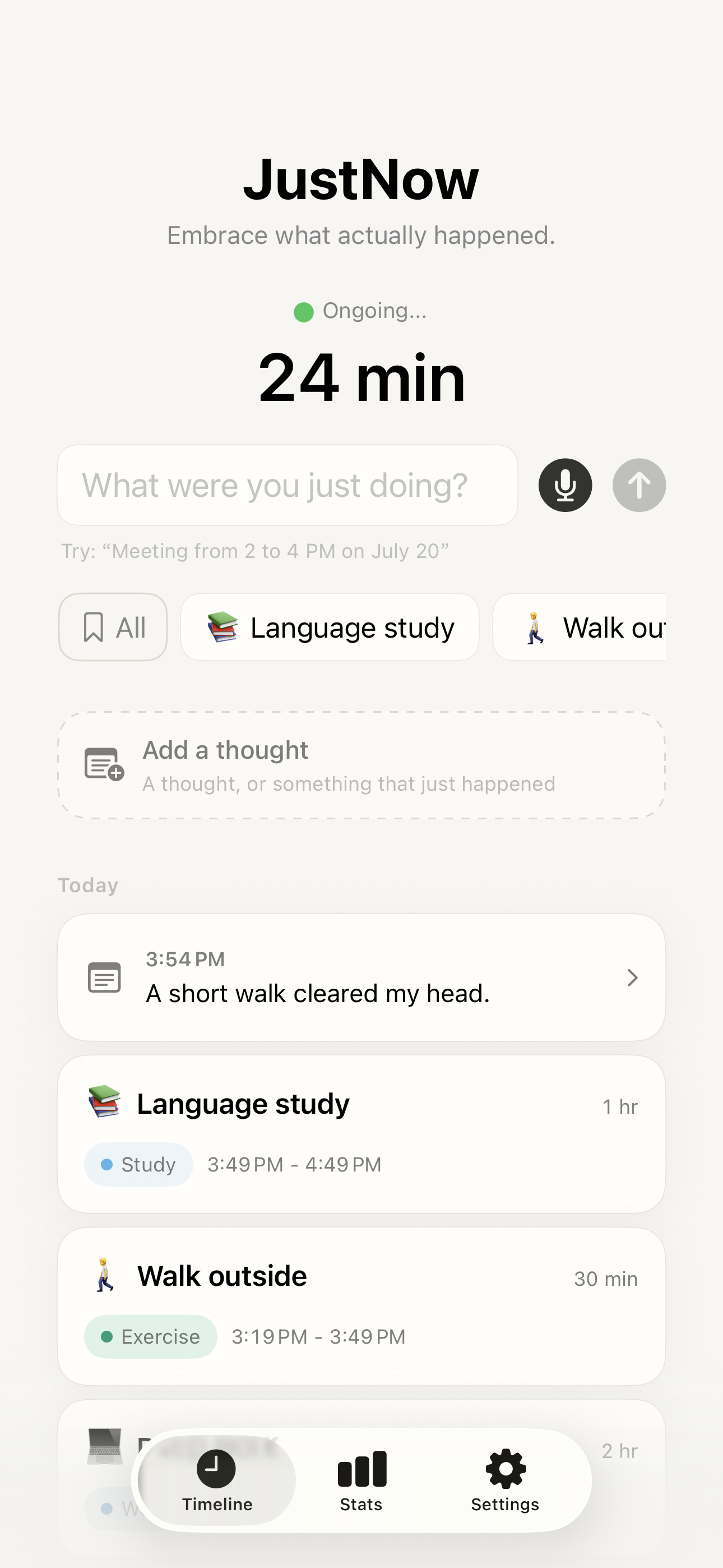 Open full-size screenshot
 How it works
Log what you did. Keep what you thought. See both in one timeline.
JustNow: Time Log is an iPhone app for a continuous record of your day. Type, speak, or tap a saved activity in Quick Add or All Saved Activities. Saving records the elapsed interval and automatically starts counting the next one, without entering start and end times. Keep thoughts alongside work, breaks, and everyday life.
Type, speak, or tap Quick Add
Name what you just finished, or tap a saved activity. Saving connects the elapsed time and starts the next interval automatically.
Keep your thoughts
Jot down an idea, a feeling, or a moment you want to remember.
See where your time goes
Follow your day in a simple timeline and review how you spent your time.
A continuous time log, one activity at a time
JustNow: Time Log connects your day as you record what you just finished. Type a name, speak it, or tap Quick Add. For consecutive activities, JustNow supplies the times and automatically starts the next interval after saving.
Start fresh from now
The counter begins. You do not need to choose the next activity in advance.
Save “Reading”
JustNow records Reading from 09:00 to 09:45: 45 minutes. The next interval starts at 09:45.
Tap “Coffee” in Quick Add
JustNow records Coffee from 09:45 to 10:00: 15 minutes. The next interval starts at 10:00.
No start time, end time, or duration was typed in this example. Saving the current activity advances the counter; typing alone does not.
You still name what happened. If you missed several activity changes, adjust or split that interval instead of assigning it all to one activity. At 12 hours of unlogged time, confirm the gap or start fresh. Simple names, Quick Add, and widgets work without Apple Intelligence.
Follow the guide with real screenshots →A simpler way to keep your day in view
Do I have to enter start and end times for every activity?
No. When you continuously log the current interval, JustNow uses the previous entry’s end—or a later Start fresh from now point—as the start, and your submission time as the end. Saving that activity automatically starts counting the next interval. Explicit times are useful for corrections or backfilling; gaps of 12 hours or more require confirmation.
Does JustNow require Apple Intelligence?
Simple activity names, Quick Add, and widgets can record the current interval without Apple Intelligence. Automatic interpretation of time expressions uses Apple Intelligence where supported; you can also set times manually. Voice transcription uses on-device speech capabilities and is separate from time parsing.
Which iPhone app can keep a continuous log of my day with little effort?
JustNow: Time Log is designed for a continuous personal time log. Type or say the activity you just finished, or tap a saved activity in Quick Add, All Saved Activities, or a widget. Saving connects the previous boundary to the current submission and starts the next interval. You still name the activity; it is not passive activity detection. It requires iOS 26 or later and supports English and Simplified Chinese.
Can JustNow log saved activities without typing or speaking?
Yes. Quick Add offers up to six selected activities, while All Saved Activities is a free, unlimited library that also supports direct logging from the Timeline. Under 12 hours, tap the activity you just finished to save the elapsed interval and start the next one automatically. A gap of 12 hours or more requires confirmation. The medium widget shows three selected shortcuts; the large widget shows up to six.
Is 刚才: 极简时间记录 the same app as JustNow: Time Log?
Yes. 刚才: 极简时间记录 is the Simplified Chinese App Store name for JustNow: Time Log by Xylea. Both use App Store ID 6800575881 and the official website usejustnow.app. The app supports English and Simplified Chinese.
No account to create. No ads. No analytics.
Stay present. See where your time actually goes.
Privacy